Time and expense
Contractor time tracking that doesn't feel like homework.
Weekly timesheets, punch clock, AI receipt OCR, per-diem, and mileage, on one platform with the same record as onboarding and classification.
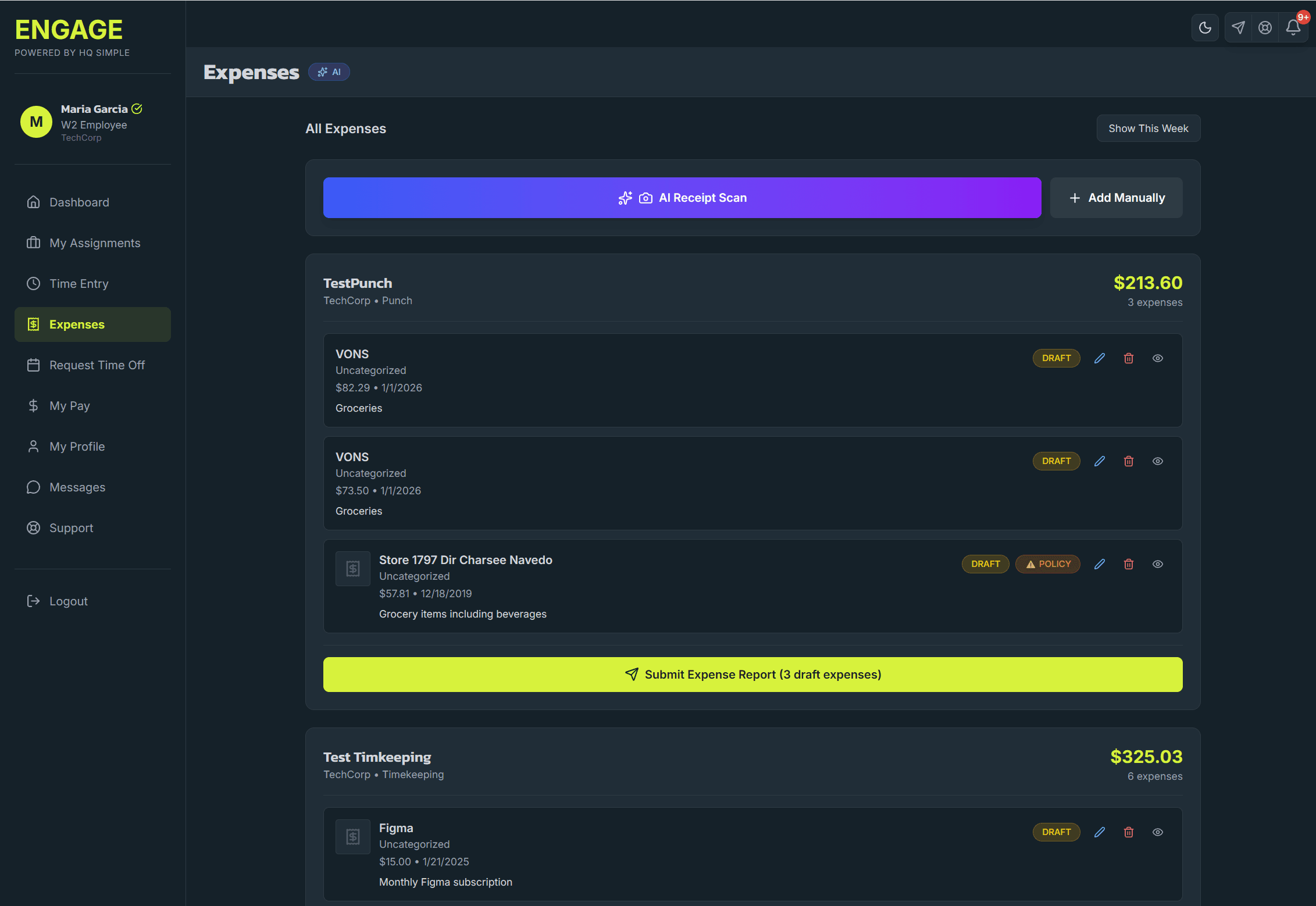
Contractor time and expense tracking is the combination of timesheet capture (hours worked by project, client, or task) and expense capture (receipts, mileage, per-diem). Engage provides both in one platform with a full AI layer on top, receipt OCR, duplicate detection, category matching, mileage validation, policy violation checks, timecard anomaly detection, and end-of-period report analysis. Timesheets are weekly grids or punch-clock based. Approvals route by project or manager. Exports feed your accounting and payroll systems.
AI receipt OCR (multi-receipt)
Snap a photo or upload a PDF, single receipt or a batch. The AI extracts vendor, date, amount, category, and line items per receipt with a confidence score per field. Human reviews and confirms.
AI duplicate-expense detector
Smart pattern recognition catches duplicate receipts across submissions, submitters, and time windows, vendor + amount + date fingerprints, re-photographed copies, and slightly-altered re-submits.
AI category matcher
Fuzzy-logic category matching with vendor pattern recognition. Categorizes new expenses based on vendor history, amount, description, and prior-approved examples.
AI mileage validator
Route analysis and pattern detection on mileage claims. Flags impossible distances, overlapping trips, and patterns inconsistent with typical work locations.
AI policy validator
Runs each expense against your policy, per-category caps, receipt thresholds, prohibited vendors, and client-specific rules, and flags violations with a reason before the approver sees it.
AI expense report analyzer
End-of-period reports ship with AI-generated trend analysis, compliance summary, and outlier highlights. Surface the exceptions without reading every row.
AI timecard anomaly detection
Flags duplicate entries, impossible overlapping entries, hours far outside typical patterns, and unusual pre/post-shift clustering. Advisory surfacing, a human makes the decision.
Weekly timesheet grid
Contractors enter hours by project, client, and task in a single weekly view. Multi-assignment support. Autosaves.
Punch clock
For time-on-site or shift-based work. Clock in, clock out, automatic total calculation.
Per-diem and mileage
Built-in mileage calculator and per-diem rates. Federal and state defaults; customizable per client.
Approval workflows
Time approval by manager, expense approval with multi-level routing. Reject with reasons. Resubmit without retyping.
Accounting exports
Export approved time and expenses as CSV or Excel. Integrations with QuickBooks, Xero, and direct payroll export in development.
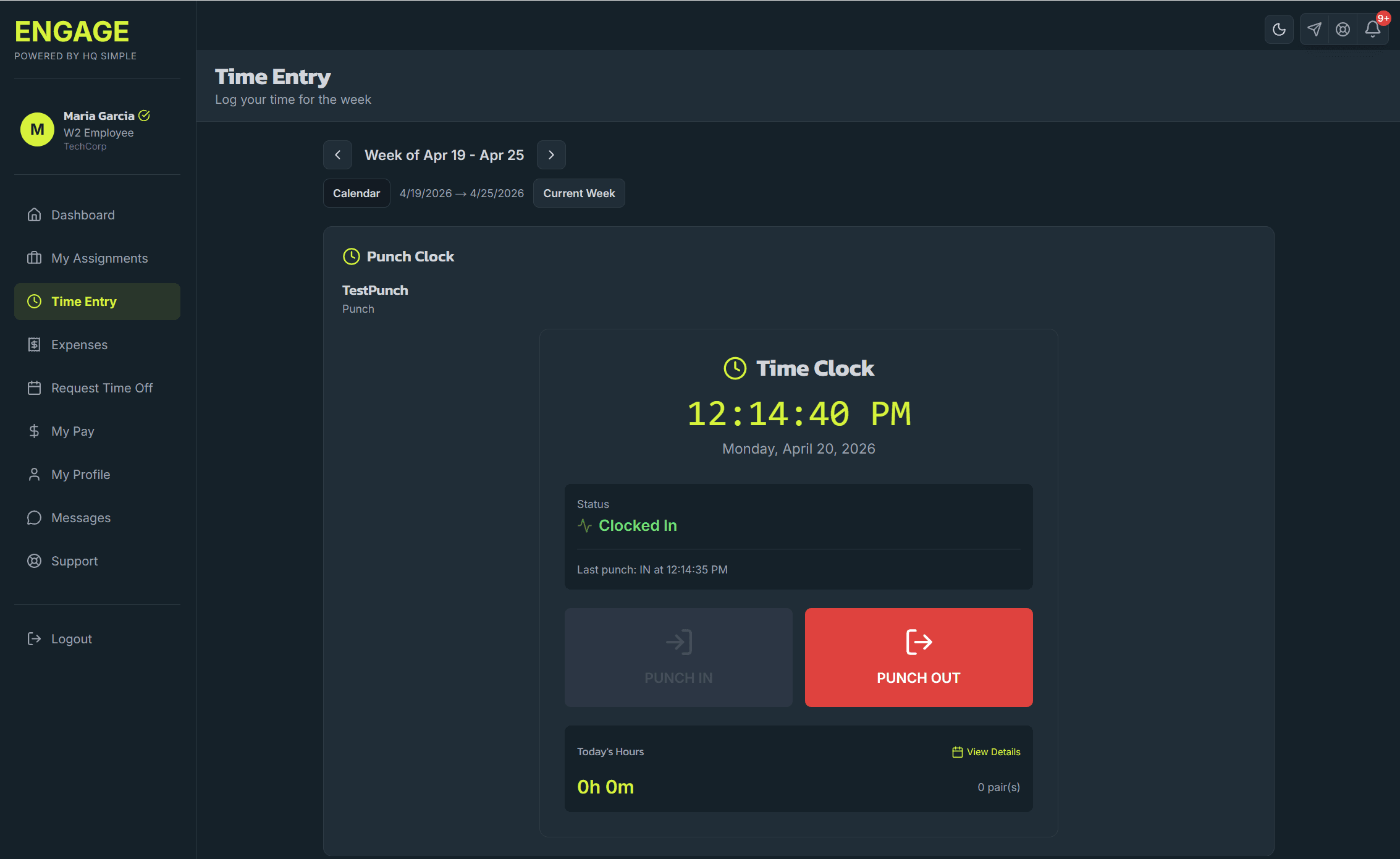
Punch Clock for shift-based and on-site work
- One-tap Punch In / Punch Out with live clock and status
- Today's hours tally on the punch panel; weekly totals roll up automatically
- Mixed-input detection, platform flags when a worker has both punch-required and manual-entry assignments in the same week
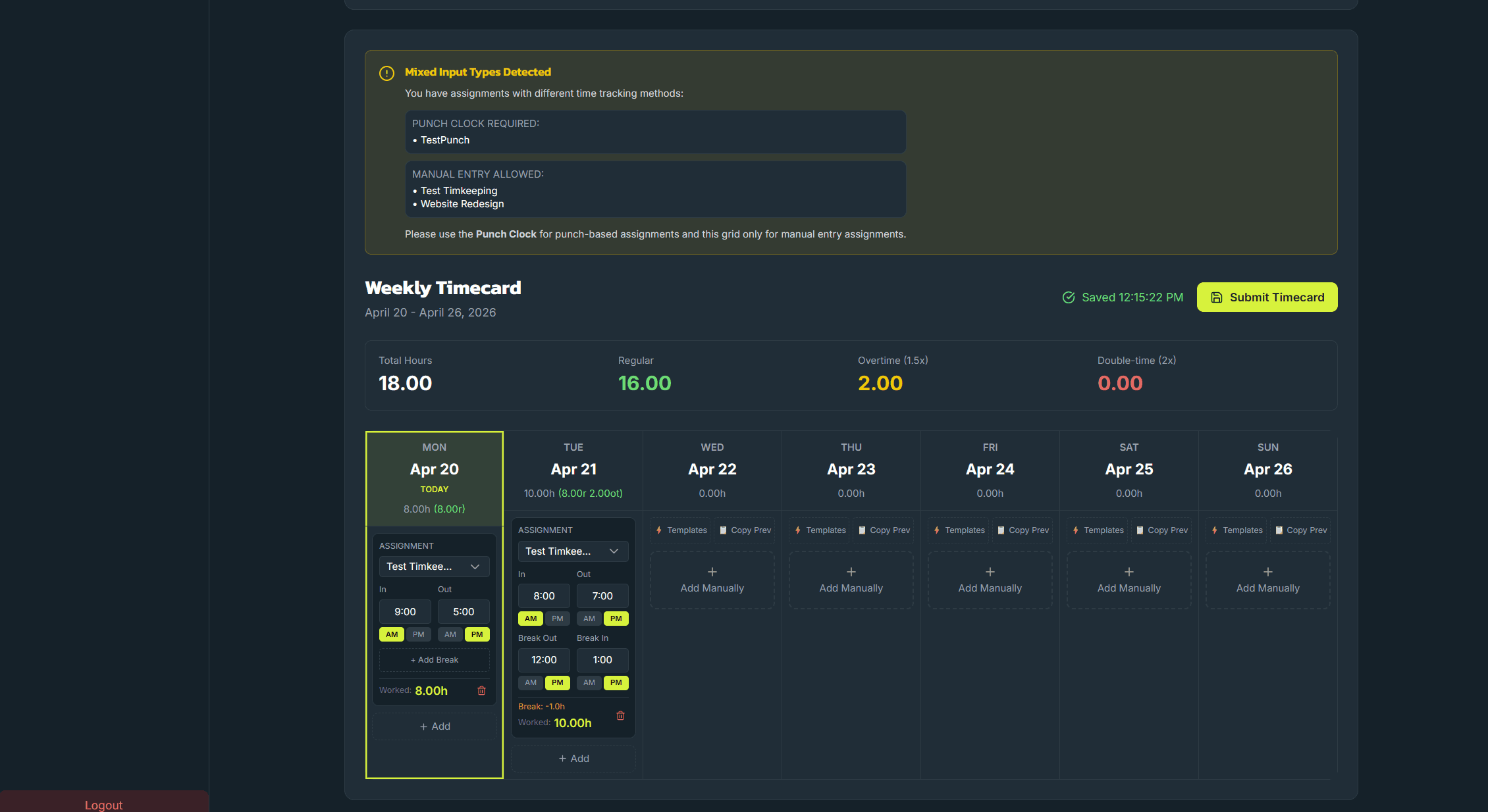
Manual weekly timesheet for project-based work
- Per-day grid with per-assignment rows, contractors allocate hours across clients and projects
- Templates (e.g. 9-5 8hrs, 8-5 8hrs + lunch) apply a full day in one click
- Break In / Break Out fields built in, with regular / overtime / double-time totals calculated live
AI-native expense tracking for contractors and W-2s
- One-tap AI Receipt Scan, vendor, date, amount, and category extracted on upload
- Draft / Pending / Policy-violation badges catch issues before an approver sees them
- Expenses grouped by assignment with a one-click Submit Expense Report action
Time and expense tooling compared
| Feature | Engage | Harvest + Expensify | Deel | Toggl + receipts in email |
|---|---|---|---|---|
| Timesheets | ||||
| Punch clock | ||||
| AI receipt OCR (multi-receipt) | ||||
| AI duplicate-expense detection | Partial | |||
| AI policy violation detection | Partial | |||
| AI mileage validation | ||||
| AI timecard anomaly detection | ||||
| Built-in per-diem + mileage | Partial | Partial | ||
| Same record as classification & onboarding | ||||
| Cost for 10 contractors | Free | ~$140/mo | ~$490/mo | ~$100/mo |
- Engage
- Harvest + Expensify
- Deel
- Toggl + receipts in email
- Engage
- Harvest + Expensify
- Deel
- Toggl + receipts in email
- Engage
- Harvest + Expensify
- Deel
- Toggl + receipts in email
- Engage
- Harvest + Expensify
- Partial
- Deel
- Toggl + receipts in email
- Engage
- Harvest + Expensify
- Partial
- Deel
- Toggl + receipts in email
- Engage
- Harvest + Expensify
- Deel
- Toggl + receipts in email
- Engage
- Harvest + Expensify
- Deel
- Toggl + receipts in email
- Engage
- Harvest + Expensify
- Partial
- Deel
- Partial
- Toggl + receipts in email
- Engage
- Harvest + Expensify
- Deel
- Toggl + receipts in email
- Engage
- Free
- Harvest + Expensify
- ~$140/mo
- Deel
- ~$490/mo
- Toggl + receipts in email
- ~$100/mo
How time and expense works day-to-day
- Contractor logs time. At the end of the day or week, the contractor opens the weekly grid or punch-clock view and records hours by project.
- Contractor uploads expenses. Receipt photos or PDFs are uploaded. The AI extracts details. The contractor reviews and submits.
- Manager approves. Approval view shows the week's total time and pending expenses. Approve, reject with reason, or request changes.
- Compliance checks run. Expired documents, overdue onboarding items, or category-rule violations surface automatically.
- Invoicing pulls the data. Approved time and expenses feed into invoice generation. Contractor can generate and submit an invoice in one click.
Why we built our own time and expense module
We originally planned to integrate with Harvest, Expensify, or a similar best-of-breed tool. The problem: every integration introduces a CSV export, a data drift risk, and another vendor bill. For contractors specifically, the time and expense record needs to live on the same row as classification, onboarding, and invoicing, otherwise you lose the audit trail. That's why it's a first-class module, not a partner integration.
What's coming
Direct integrations with QuickBooks and Xero on the export side are the next roadmap priority. A dedicated mobile experience is on the roadmap but not active development. If either is blocking for you, let us know in your beta application, it helps us prioritize.
Frequently asked questions
- Yes. You can require contractors to track their time for billing, compliance, and project transparency. The key is that time-tracking itself is not a classification risk factor, what matters is whether you control how they work. Requiring time entry for billing purposes is standard practice and does not convert a 1099 to a W-2.
Managing international contractors?
HQ Simple's EOR service handles time, expense, and payment in local currency for your international contractors, while the data stays visible in your Engage dashboard.
Ready to engage your workforce?
Start with the free ATS. Grow into contractor management, VMS, and International EOR without changing systems.